CLI and Execution Modes
Command Surface
ClearEx installs the clearex command.
Current primary arguments are:
--flatfield--deconvolution--particle-detection--usegment3d--channel-indices--input-resolution-level--shear-transform--registration--fusion--display-pyramid--visualization--render-movie--compile-movie--volume-export--mip-export--file--migrate-store--migrate-output--migrate-overwrite--dask/--no-dask--chunks--stage-axis-map--gui/--no-gui--headless
Execution Modes
The entrypoint is GUI-first by default:
clearexattempts GUI launch.--headlessforces non-interactive mode.--no-guidisables GUI launch attempts.GUI launch failures (missing display/runtime issues) fall back to headless mode with warnings.
GUI Setup Flow
The first GUI window is an experiment-list driven setup flow:
Load Experimentadds one Navigateexperiment.yml/experiment.yaml.Create Experiment Listcan either: - recursively scan a folder for Navigate experiment descriptors, or - reload a saved ClearEx list file (.clearex-experiment-list.json).Drag and drop accepts individual experiment descriptors, folders to scan, and saved list files.
Selecting an entry in the list automatically loads the metadata panel.
Double-clicking a list item reloads that experiment’s metadata explicitly.
The current ordered list can be saved back to a reusable
.clearex-experiment-list.jsonfile.Spatial Calibrationedits store-level worldz/y/xplacement mapping for the currently selected experiment without rewriting image data.Spatial-calibration drafts are tracked per experiment while setup is open.
Existing canonical stores prefill the spatial-calibration control when metadata is already present.
Pressing
Nextbatch-prepares canonicaldata_store.ome.zarrstores for every listed experiment that is missing a complete store, persists the resolved spatial calibration to every reused or newly prepared store, then opens analysis selection for the currently selected experiment.Rebuild Canonical Storeforces the listed stores to be rebuilt as canonical OME-Zarr outputs with the current chunk and pyramid settings.
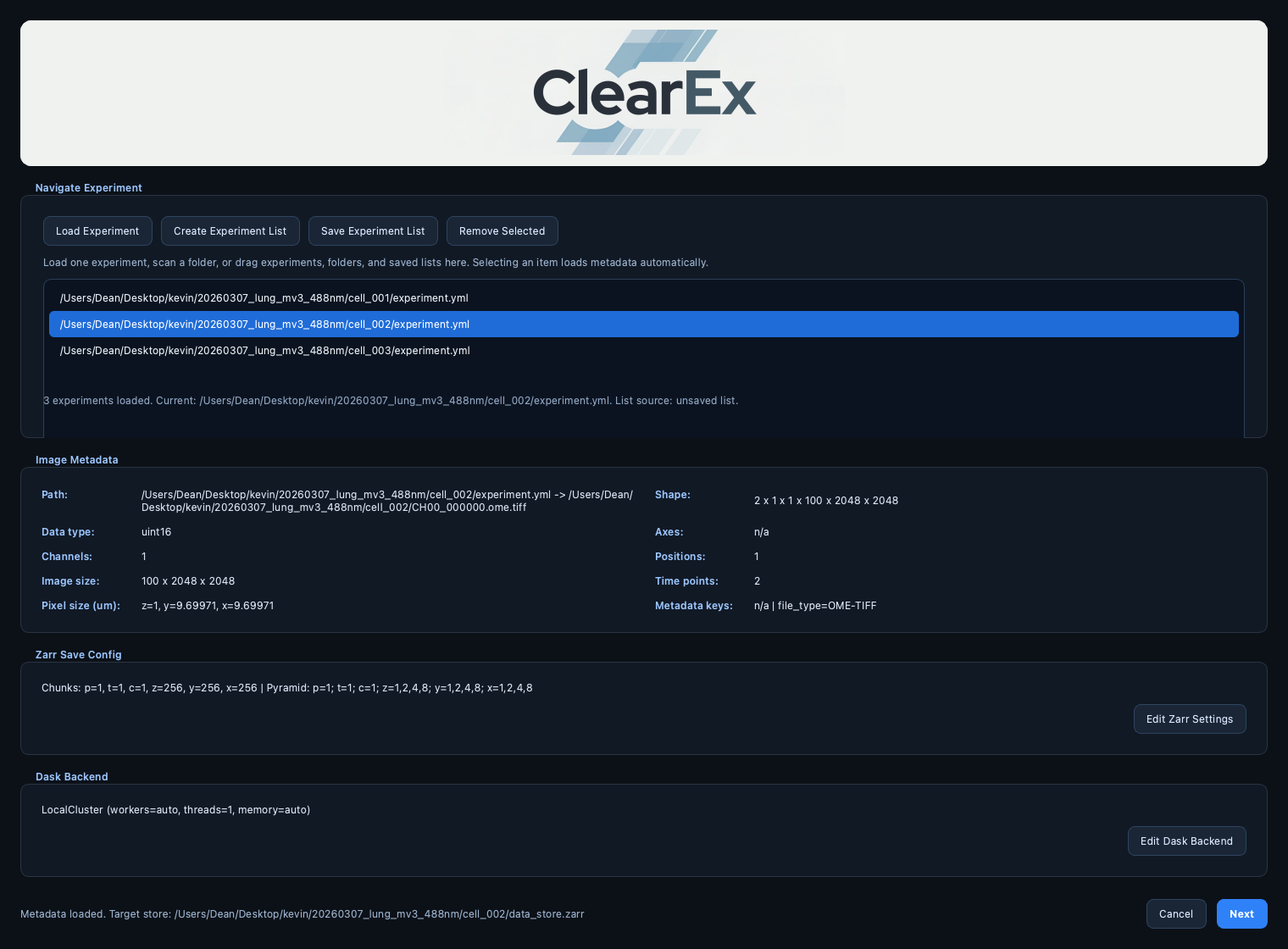
Setup dialog with the experiment list pane, automatic metadata loading, and themed list-management controls.
Workflow Selection
Each analysis flag is independent. You can run a single operation or multiple operations in one run.
In the GUI analysis window:
Analysis Scopelets you choose which loadedexperiment.ymlis the active analysis target.Enabling the batch checkbox runs the same selected operation set across all experiments from the setup list instead of only the selected one.
Per-dataset analysis widget state is restored automatically when available: saved GUI state is preferred, and
Restore Latest Run Parametersfalls back to the latest completed provenance-backed run for the active store.
Examples
# GUI-first default
clearex
# Headless chained run
clearex --headless \
  --file /path/to/experiment.yml \
  --flatfield --deconvolution --particle-detection
# Headless visualization against an existing canonical OME-Zarr store
clearex --headless \
  --file /path/to/data_store.ome.zarr \
  --visualization
# Headless movie workflow against an existing canonical OME-Zarr store
clearex --headless \
  --file /path/to/data_store.ome.zarr \
  --render-movie

clearex --headless \
  --file /path/to/data_store.ome.zarr \
  --compile-movie
# Headless Navigate run with explicit stage-to-world placement mapping
clearex --headless \
  --file /path/to/experiment.yml \
  --visualization \
  --stage-axis-map z=+x,y=none,x=+y
# Headless volume export against an existing canonical OME-Zarr store
clearex --headless \
  --file /path/to/data_store.ome.zarr \
  --volume-export
# Migrate one legacy ClearEx store
clearex --migrate-store /path/to/legacy_store.zarr
Spatial Calibration
Spatial calibration is a store-level mapping from world z/y/x placement
axes to Navigate multiposition stage coordinates.
Canonical text form is
z=...,y=...,x=....Allowed bindings are
+x,-x,+y,-y,+z,-z,+f,-f, andnone.Default identity mapping is
z=+z,y=+y,x=+x.nonedisables translation on that world axis.THETAremains interpreted as rotation of thez/yplane about worldx.
GUI and headless flows share the same normalized parser and storage policy:
GUI setup writes the resolved mappings to the listed experiment stores on
Next.--stage-axis-mapwrites an explicit override to Navigate-materialized stores and existing canonical OME-Zarr stores before analysis starts.If no explicit override is supplied, existing store calibration is preserved.
The mapping changes placement metadata only; image payloads remain unchanged.
Interchangeable Routine Composition
In orchestration, routines are composed from normalized
analysis_parameters rather than hard-coded fixed order:
execution_orderdecides sequence among selected routines.input_sourcedecides which logical upstream component each routine reads.force_reruncan override provenance-based skip behavior.
This allows operators to rerun one stage, swap stage order, or run partial
chains without changing the code path in main.py.
registration and fusion are intentionally split so operators can run
transform estimation and final stitched rendering in separate executions with
different backend sizing or worker-memory limits. registration always
persists affine transform/layout metadata; when the experimental deformable
follow-up is enabled it also persists a coarse displacement lattice that
fusion consumes automatically. Older affine-only registration results
remain valid fusion inputs.
Input Source Resolution
Runtime source aliases currently include:
data->clearex/runtime_cache/source/dataflatfield->clearex/runtime_cache/results/flatfield/latest/datadeconvolution->clearex/runtime_cache/results/deconvolution/latest/datashear_transform->clearex/runtime_cache/results/shear_transform/latest/datafusion->clearex/runtime_cache/results/fusion/latest/datausegment3d->clearex/runtime_cache/results/usegment3d/latest/dataregistration->clearex/results/registration/latest(metadata-only; consumed byfusion; may include optional deformable lattice metadata)visualization->clearex/results/visualization/latest(metadata-only; consumed byrender_movie)render_movie->clearex/results/render_movie/latest(metadata-only; consumed bycompile_movie)compile_movie->clearex/results/compile_movie/latest(metadata-only; terminal export metadata)
Public OME image collections at the root and under results/<analysis>/latest
exist for interoperability and visualization. Analysis kernels should not write
into those public arrays directly.
Volume Export
volume_export is a visualization-family export workflow for one selected
image-producing source component.
input_sourceresolves the upstream image-producing component to export. It accepts the usual runtime aliases such asdata,flatfield,deconvolution,shear_transform,fusion, and explicit internal component paths.force_rerunbypasses provenance-based reuse and rewrites the latest export payload even when matching latest metadata already exists.export_scope=current_selectionexports one explicit(t, p, c)volume.export_scope=all_indicesexports every available(t, p, c)volume.t_index,p_index, andc_indexselect the exported volume whenexport_scope=current_selection. They are ignored forexport_scope=all_indices.resolution_levelcan reuse discovered source-adjacent pyramid levels or generate missing deeper levels during export.export_format=ome-zarrpublishesresults/volume_export/latestfrom the runtime cache.export_format=ome-tiffwrites in-store artifacts under<analysis_store>/clearex/results/volume_export/latest/files.tiff_file_layout=single_filewrites one current-selectionZYXOME-TIFF or one all-position BigTIFF with oneTCZYXseries per position.tiff_file_layout=per_volume_fileswrites oneZYXOME-TIFF per exported(t, p, c)volume.memory_overhead_factoris preserved in the normalized workflow payload as a scheduler hint, even though the current export implementation does not use it directly.chunk_basis,detect_2d_per_slice,use_map_overlap, andoverlap_zyxare normalized compatibility fields inherited from other volume analyses and are pinned to 3D/no-overlap behavior forvolume_export.
When a requested source component does not exist, runtime raises an input dependency error instead of silently falling back.
The CLI currently exposes --volume-export as the operation flag. Detailed
parameter editing is currently done through the GUI or a programmatic
WorkflowConfig.analysis_parameters["volume_export"] payload. The full
parameter-by-parameter reference lives in
Analysis Workflow: Volume Export.
Progress and Run Lifecycle
Execution progresses through these coarse stages:
Resolve workflow and inputs.
Materialize canonical OME-Zarr store when needed.
Execute selected analyses in resolved order.
Publish latest outputs and append provenance run record.
GUI execution uses explicit progress callbacks and per-run logging in the
resolved workflow log directory. File-backed runs also write a sibling
*.events.jsonl structured audit log containing chronological workflow,
input, analysis-step, progress, skip, failure, cancellation, and provenance
events. Credential-like metadata keys are redacted before writing. When a run
persists provenance in a canonical store, the final JSONL log is copied to
clearex/provenance/event_logs/<run_id>.jsonl and the run record stores its
manifest, event count, checksum, execution id, and redaction policy.
The Running Analysis dialog exposes an Open Dask Dashboard button.
GUI dashboard launch behavior is:
ClearEx opens a localhost-only tokenized relay rather than the raw scheduler dashboard URL directly.
The relay is available only while a ClearEx-managed Dask client for the active analysis workload is alive.
The
Running Analysisdialog enables its dashboard button only while the current run owns a live analysis client.If ClearEx cannot reach the upstream dashboard or cannot start the relay, the GUI shows a warning and does not open the raw dashboard URL.
The Running Analysis dialog also includes a Stop Analysis button.
Cancellation is cooperative: ClearEx stops at the next progress checkpoint and
persists the interrupted run in provenance with status=cancelled.
Visualization Keyframe Capture
When visualization launches napari, keyframe capture is enabled by default:
Press
Kto capture a keyframe.Press
Shift-Kto remove the most recent keyframe.
The keyframe manifest path defaults to:
<analysis_store>/clearex/results/visualization/latest/keyframes.json
and can be overridden with keyframe_manifest_path in visualization
parameters.
Each keyframe stores enough state to recreate the current scene for movie generation, including:
camera values (angles, zoom, center, perspective),
dims state (current step, axis labels, order, and 2D/3D mode),
layer order and selected/active layers,
per-layer display configuration (visibility, LUT/colormap, rendering mode, blending, opacity, contrast, and transforms when available).
The GUI provides a popup editor (Layer/View Table...) for optional
per-layer overrides with columns:
Layer,Visible,LUT/Colormap,Rendering,Annotation.
Movie Rendering and Compilation
ClearEx now separates movie generation into two explicit operations:
render_movie: reconstructs the visualization scene from the keyframe manifest and renders PNG frames for one or more selected resolution levels.compile_movie: validates one rendered frame set and encodes it throughffmpeginto MP4, ProRes MOV, or both.
Runtime storage:
render_movielatest metadata lives underclearex/results/render_movie/latest.compile_movielatest metadata lives underclearex/results/compile_movie/latest.Default in-store artifacts include
<analysis_store>/clearex/results/visualization/latest/keyframes.json,<analysis_store>/clearex/results/render_movie/latest/render_manifest.json,<analysis_store>/clearex/results/render_movie/latest/level_<nn>_frames/frame_000000.png,<analysis_store>/clearex/results/compile_movie/latest/*.mp4, and<analysis_store>/clearex/results/compile_movie/latest/*.mov.output_directorycan still redirectrender_movieorcompile_movieto an external export tree when desired.
Practical guidance:
Use coarse levels such as
[1]or[2]plus moderate frame sizes for preview renders.Use level
0and the final frame size for publication renders.default_transition_framesaround48is a good default for smooth motion.mp4_crfin the16to24range is a reasonable review/final quality band, with lower values trading size for quality.Rebuild timing and codec settings with
compile_moviefirst, because it is much faster than rerendering napari screenshots.
Captured napari Points and Tracks layers are serialized into the
keyframe manifest and rebuilt during render_movie so common particle/track
overlays can survive beyond the interactive session.
render_movie now captures from a visible napari viewer by default.
This avoids the empty-frame failures seen with hidden/offscreen capture while
keeping CPU/software rendering and GPU-backed rendering usable.
When ClearEx is already running inside a Qt GUI, the visible movie-capture
viewer is launched in a dedicated subprocess so rendering does not touch Qt
or OpenGL from the GUI worker thread.
The CLI currently exposes --render-movie and --compile-movie as
operation flags. Detailed movie parameter editing is currently done through the
GUI or a programmatic WorkflowConfig.analysis_parameters payload.